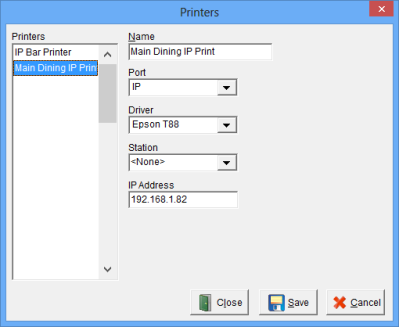
The Network Printers Window is used to establish Guest Check Printers.
While in Focus Setup, select Printers > Printers.
Figure 5.17.1 Remote Printers Window
Figure 5.18.1 Printers Window Fields
| Field |
Description |
||||||||
| Name | A unique name for each Printer, up to 15 alphanumeric characters. | ||||||||
| Port |
|
||||||||
| Driver | The Driver associated with the installed Printer. Drivers are setup in Printers > Drivers. | ||||||||
| Station | The Station that will print the Remote Check. If a Station is not selected then the printer is not operational. | ||||||||
| IP Address | IP Address for the printer. (For information on changing the default IP address consult your printers product manual.) |
Figure 5.18.1a Printers Window Commands
| Command |
Description |
| Close | Closes the Remote Printers Window. |
| Save | Saves current changes. |
| Cancel | Cancels changes made prior to saving. |
Procedure to create IP Printers
This printer will now be available as a Guest Check Printer in Locations > Stations. For use with a Mobile Device, select this printer as the Guest Check printer and enable 'Allow Mobile Printing'.
Related Topics
Assigning Printers to Stations
See also (Printers > Drivers)
See also (Printers > Formats)