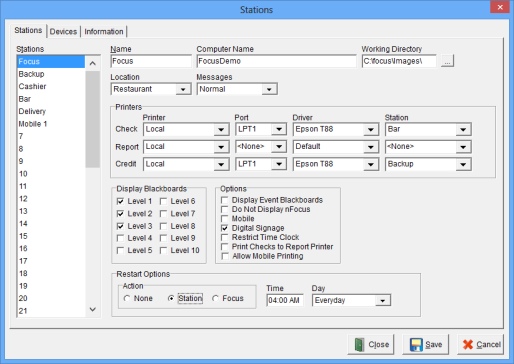
Stations Windows

The Stations Window is used to establish the basic attributes such as the Name, Location and Printers of up to 50 Stations. Note: Click the link to see a Knowledge Based Article on How to Set Up a Station.


Accessing the Stations Window

While in Focus Setup, select Locations > Stations.


Figure 7.26 Stations Window


Figure 7.27 Stations Window Fields

Field

Description

Name A unique name for each Station, up to 15 alphanumeric characters. The name of the Station is displayed at the bottom of the Login Window.
Computer Name The Windows Computer Name for the Station, up to 40 alphanumeric characters.
Working Directory The path for the image files.
Location

The Location of the Station.

Messages

Note: Messages refers to the activity being performed on the system, not messages being sent to and from employees. This provides a way for support to audit what has happened on a particular station in the case of a support issue.

Normal Audit trail messages will be logged.
Detailed Extensive messaging will be logged.
None Messages will not be recorded.
Local Messages will be recorded on the individual Station.
Printers

See knowledge Based Article: Local Printer Setup.

Check
Printer Designate if the printer is Local . Available selections are Local or any printer setup in Printers > Network Printers.
LocalPrinter is attached to the station directly. Select local port and printer driver.
Name

Printer is a printer setup in Printers > Network Printers.

(V 7.4 Build 13.4.01)

Port The Port the Guest Check printer is connected. Available selections are Com1 through Com32, Lpt1 and Lpt2.
Driver The Printer Driver for the Guest Check printer.
Station The Station that the Guest Check printer is attached. Multiple Stations may share the same printer.
Report
Printer Designate if the printer is Local . Available selections are Local or any printer setup in Printers > Network Printers.
LocalPrinter is attached to the station directly.
NamePrinter is a printer setup in Printers > Network Printers.
Port The Port the Guest Check printer is connected. Available selections are Com1 through Com32, Lpt1 and Lpt2.
Driver The Printer Driver for the Report printer.
Station The Station that the Report printer is attached. Multiple Stations may share the same printer.
Credit
Printer Designate if the printer is Local . Available selections are Local or any printer setup in Printers > Network Printers.
LocalPrinter is attached to the station directly.
NamePrinter is a printer setup in Printers > Network Printers.
Port The Port the Guest Check printer is connected. Available selections are Com1 through Com32, Lpt1 and Lpt2.
Driver The Printer Driver for the Credit printer.
Station The Station that the Credit printer is attached. Multiple Stations may share the same printer.
Display Blackboards
Level 1-10 Blackboards with the selected Levels will be displayed.
Options
Display Event Blackboards Blackboards triggered by Events will be displayed.
Do Not Display nFocus The Station will not display the nFocus Dashboard.
Mobile The Station will be configured as a mobile station.
Digital Signage A digital signage board will be attached to the Station. See Video: Digital Signage
Restrict Time Clock Restricts employees from using the time clock feature on the Station.
Print Checks to Report Printer

Prints guest checks to the configured Report Printer.

(V 7.4 Build 13.1.03)

Allow Mobile Printing When selected, the guest check printer assigned to this station will be available for Mobile Devices to print guest checks to.
Restart Options

Action

None The Station is not restarted.
Station

The software exits automatically and Windows is restarted. Note: This is the recommended option.

Time The time that Windows restarts.
Day The day of the week that Windows restarts. Note: if a day is not selected and a time is specified then the software exits daily.
Focus

The software exits automatically and Focus is restarted.

Time The time Focus restarts.
Day The day of the week that Focus restarts. Note: if a day is not selected and a time is specified then the software exits daily.


Figure 7.27.1 Stations Window Commands

Command

Description

Close Closes the Stations Window.
Save Saves current changes.
Cancel Cancels changes made prior to saving.


Procedure to Establish Stations


Related Videos

Printing Guest Checks to Report Printers

Digital Signage

Related Topics

See also (Locations > Stations > Devices)

See also (Locations > Stations > Information)

Job Right ‘Office - Stations’