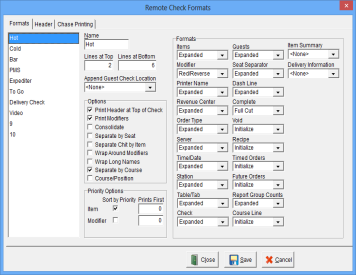
| Name |
A unique name for each Remote Check Format, up to 15 alphanumeric characters. |
| Lines at Top |
The number of blank lines at the top of the check. |
| Lines at Bottom |
The number of blank lines at the bottom of the check. |
| Append Guest Check Location |
The guest check (configured using the Location selected) to append to the Remote Check. If no header attributes are specified for the Remote Check then only the guest check is printed on the Remote Printer. |
| Options |
| Print Header at Top of Check |
Prints the Header at the top of the check. Turn this option off to print the header at the bottom of the check. |
| Print Modifiers |
Modifiers will be printed on the check. |
| Consolidate |
Menu Items that have the same Menu Name, Price, Modifiers and have not been split will be consolidated. |
| Separate by Seat |
Menu Items will be printed by seat order. Note: The Sort by Priority and Consolidate Options are not used when this option is on. Note: The check is sorted by Position not by Seat if the “Display Position” option is on for the Location. |
| Separate Chit by Item |
Each Menu Item will print on a separate check. Note: The Consolidate option is not used when the Separate Chit by Item option is on. |
| Wrap Around Modifiers |
Modifiers will print on the same line, separated by commas, and wrap around to the next line if necessary. |
| Wrap Long Names |
Names that do not fit on one line will wrap around to the next line. |
| Separate by Course |
Each course will be separated by a line break. See Video Courses. |
| Course/Position |
Menu Items will be grouped by Courses and sorted within each Course by Position, beginning with Position 1.
(V 7.4 Build 13.1.03)
|
|
| Priority Options |
| Sort by Priority |
Items are printed in ascending priority order followed by items with a zero priority. Note: Items are printed in the order that they were entered if this option is off. |
| Prints First |
Items with this priority will always print first if this value is not zero. |
|
| Formats |
| Items |
The Printer Format used to print the Item name. |
| Modifier |
The Printer Format used to print the Modifier name. |
| Printer Name |
The Printer Format used to print the Printer name. |
| Revenue Center |
The Printer Format used to print the Revenue Center name. |
| Order Type |
The Printer Format used to print the Order Type name. |
| Server |
The Printer Format used to print the Server name. |
| Time/Date |
The Printer Format used to print the Time/Date. |
| Station |
The Printer Format used to print the Station name. |
| Table/Tab |
The Printer Format used to print the Table/Tab name. |
| Check |
The Printer Format used to print the Check number. |
| Guests |
The Printer Format used to print the number of Guests. |
| Seat Separator |
The Printer Format used to print the Seat Separator divider. |
| Dash Line |
The Printer Format used to print the Dash Line separator. |
| Complete |
The Printer Format used at the end of the check (i.e., paper cut). |
| Void |
The Printer Format used to print Voided Items. Voided items will only print if a Format is selected. |
| Recipe |
The Printer Format used to print the Recipe. The recipe file is printed after each Menu Item if a Format is selected. |
| Timed Orders |
The Printer Format used to print the Menu Item Cook Time. The cook time will only print if a Format is selected.
|
| Future Orders |
The Printer Format used to print Future Order information. Future Order information will only print if a Format is selected. See Video: Future Orders |
| Report Group Counts |
The Printer Format used to print Report Group Counts. Report Group Counts only print if a Format is selected. |
| Course Line |
The Printer Format used to print the Course Line.
(V 7.4 Build 13.9.12)
|
| Item Summary |
The Printer Format used to print the Item Summary.
(V 7.4 Build 13.9.12)
|
| Delivery Information |
The Printer Format used to print the Delivery Information.
(V 7.4 Build 13.9.12)
|
|