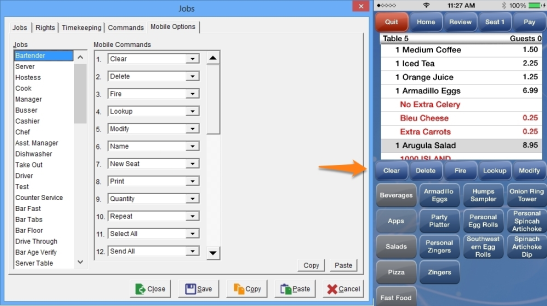
Mobile Commands appear beneath the guest check in the middle of the display. Five (5) Commands are displayed at a time. To view more Commands slide your finger across the Command line to the right or left.
Restrictions
Only select Commands are available for use with Focus Mobile. See Mobile Commands.
While in Focus Setup, select Employees > Jobs > Mobile Options.
Figure 13.11.6.h Mobile Options Window and corresponding Focus Mobile Command Line
Figure 13.11.5e Description of Available Mobile Commands
| Command |
Description |
||||||||
| Clear | Removes all Menu Items from the check that have not been sent. | ||||||||
| Delete | Allows the employee to delete Menu Items that have not been saved or sent. | ||||||||
| Fire | Allows an employee to send a Menu Item that is highlighted before sending the rest of the order. | ||||||||
| Lookup | Allows the user to search for menu items either by typing in the menu item name or scrolling through all the menu items. As you begin to type, the software begins to filter the menu items. | ||||||||
| Modify | Allows the employee to add optional modifiers to a Menu Item. | ||||||||
| Name | Allows the employee to enter/edit the Name or ID associated with an open guest check. The Job Right ‘Name - Enter’ is required. Note: If a user has the 'Name' command in Focus Mobile, the Job Right is overridden and the employee can enter a Name without the proper rights. | ||||||||
| New Seat | Allows the employee to add another seat to the check. | ||||||||
| Allows the employee to optionally print or reprint a guest check. If more than one seat on the check is present, the user will be prompted to print the current, selected, or all seats. | |||||||||
| Quantity | Allows the employee to enter the number of Menu Items to order. | ||||||||
| Repeat | Allows the employee to reorder highlighted Menu Items and their associated modifiers. | ||||||||
| Select All | Selects or unselects all Menu Items in the current check. | ||||||||
| Send All | Sends all Items that have not been sent on the current check. | ||||||||
| Split |
Allows the employee to split the check into multiple checks.
|
||||||||
| Stop Timer | Stops the time on Items that use a 'Timed Rate' and applies the proper price. | ||||||||
| Capture | Allows the employee to capture a credit card without authorizing that card. | ||||||||
| Finalize |
Allows the employee to close a check that has been preauthorized or captured. |
||||||||
| Discount | Allows the employee to view and apply applicable discounts. |
Process to setup commands for Focus Mobile
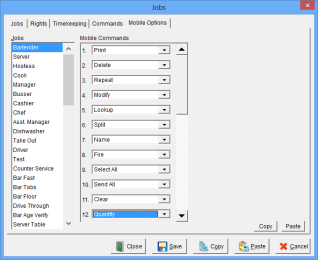
Note: If 'Name' and 'Split' are available, users will be able to perform commands from Mobile devices regardless of Job Rights.
Related Videos
None
Related Topics