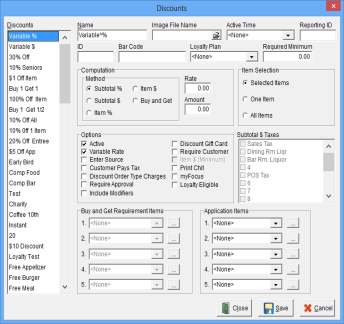
The Discounts Window is used to establish and maintain Discounts. Discounts may be applied to Menu Items and Gift Cards. Discounts may be a percentage or a dollar amount and may be used to enter coupons or promotions.
A specific Discount Canvas may be created to show all Discounts, or individual Discounts may be shown on various Canvases. The use of Discounts may be strictly controlled using the Required Items and Application Items features. In addition to management authorization, use of specific Discounts at a Location may be inhibited by the configuration of Canvases.
Accessing the Discounts Window
While in Focus Setup, select Order Entry > Discounts.
Figure 6.14 Discounts Window
Figure 6.15 Discounts Window Fields
| Field |
Description |
||||||||||||||||||||||||||||||
| Name | A unique name for each Discount, up to 15 alphanumeric characters. | ||||||||||||||||||||||||||||||
| Image File Name | The graphic that represents the Discount. | ||||||||||||||||||||||||||||||
| Active Time | The Time Range the Discount is active. | ||||||||||||||||||||||||||||||
| Reporting ID | A unique identifier for the Discount, up to 10 alphanumeric characters (ID Explicit). | ||||||||||||||||||||||||||||||
| ID | A unique identifier for the Discount, up to 8 alphanumeric characters. | ||||||||||||||||||||||||||||||
| Bar Code | The Bar Code used to identify the Discount when scanned. | ||||||||||||||||||||||||||||||
| Loyalty Plan | The Loyalty Plan associated with the Discount. | ||||||||||||||||||||||||||||||
| Required Minimum | The minimum dollar amount that must be on the check before the discount is active. | ||||||||||||||||||||||||||||||
| Computation |
|
||||||||||||||||||||||||||||||
| Item Selection (Not applicable to the Buy and Get Discount) |
|
||||||||||||||||||||||||||||||
| Options |
|
||||||||||||||||||||||||||||||
| Subtotal $ Taxes | The Taxes that are removed from the Subtotal $ Discount if the “Customer Pays Tax” option is off. | ||||||||||||||||||||||||||||||
| Buy and Get Requirement Items | Applies only to Buy and Get Discounts. The Menu Item Filters containing the items that must be ordered before the Discount can be applied to the items contained in the Application Items. | ||||||||||||||||||||||||||||||
| Application Items | The Menu Item Filters that determine the items eligible to Discount. All items are eligible if a Filter is not selected. |
Figure 6.15.1 Discounts Window Commands
| Command |
Description |
| Close | Closes the Discounts Window. |
| Save | Saves current changes. |
| Cancel | Cancels changes made prior to saving. |
Procedure to Establish Discounts
Related Topics
Job Right – ‘Office - Discounts’