Filters   
Purpose
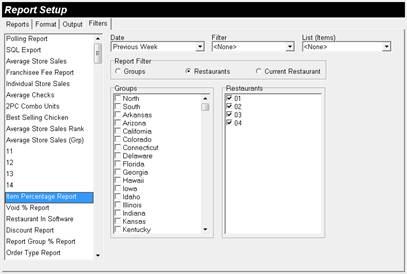
The Filters Window is used to establish the Restaurants that will be used for the Report.
 
Accessing the Filters Menu
While in Report Setup, select Filters.
 
 
Figure 4.5.34 Filters Window
 
Figure 4.5.35 Filters Window Fields
Field
Description
Date
Current Day

The report date range will default to the Current Day.

Previous Day

The report date range will default to the Previous Day.

Current Week

The report date range will default to the Current Week.

Previous Week

The report date range will default to the Previous Week.

Current Month

The report date range will default to the Current Month.

Previous Month

The report date range will default to the Previous Month.

Current Year

The report date range will default to the Current Year.

Previous Year

The report date range will default to the Previous Year.

Filter
<None>

The report will not filter Items.

List

The report will use Items specified in the List.

List (Items)
<None>

The report will not be Filtered.

List

The List to use for the report.

Non-Corporate Items

The report will only display Items that are not found in the Default Restaurant.

Report Filter
Groups
Groups

The selected Groups will be included in the report.

Restaurants
Restaurants

The selected Restaurants will be included in the report.

Current Restaurant
The Default Restaurant will be used as the primary restaurant for the report.

 
Related Topics (none)


Copyright © 2007 Focus POS Systems