|
Field
|
Description
|
|
Corporate
Name
|
The name of the Corporation, up to
35 alphanumeric characters.
|
|
Corporate
Image File Name
|
An image that represents the
Corporation. The Corporate Image is displayed on the Corporate Window.
|
|
Corporate
E-mail Address (Sender)
|
The E-mail address of the
Corporation.
|
|
Default
Restaurant
|
The Default Restaurant determines
the configuration files used in the Restaurant Menu. The Default Restaurant
is also used as the primary selection for Restaurant Reports.
|
|
E-mail
Outgoing Mail (SMTP) Options
|
|
SMTP
Server
|
The
outgoing SMTP server used to send E-mails.
|
|
User
Name (Authentication)
|
The user name used
to send E-mails if authentication is used.
|
|
Password
(Authentication)
|
The password used to
send E-mails if authentication is used.
|
|
Use
Authentication
|
Select if
authentication is needed to send E-mails.
|
|
 General
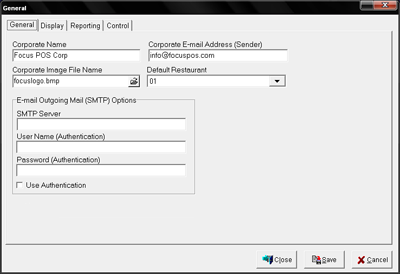 Figure 4.2.2
General Window
Figure 4.2.2
General Window