Purpose
Install and add the E-Server to the Startup Menu on the designated 'Mobile Station'.
Restrictions
The PC running the E-Server must have a static local IP Address.
.Net Framework of the PC must be 2.0 or higher.
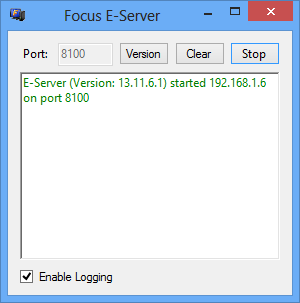
Figure 13.11.6.c Focus E-Server
Figure 13.11.6.d Focus E-Server Fields and Descriptions
| Field |
Description |
| Port | The Port the E-Server is accessing. |
| Version | The current Version of the E-Server. |
| Clear | Clears all correspondence in the E-Server. |
| Stop | Stops the E-Server (Stop and Start toggle). |
| Start | Starts the E-Server (Stop and Start toggle). |
| Enable Logging | When selected, mobile logging will occur. |
Process to Installing the E-Server and Adding the E-Server to the Startup Menu
Step 1: Install the E-Server
Note: If the Focus E-Server does not display ensure the computers .Net Framework is 2.0 or higher. See Minimum System Requirements.
Note: Any Port number can be designated.
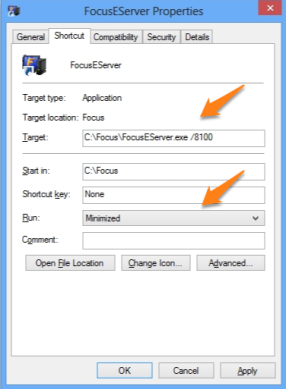
Step 2: Add the E-Server to the Desktop and Start-up Menu.
Note: There is a space between 'exe' and the forward slash.
Note: In the above example '8100' is the Port number provided by the E-Server. This number may differ for each system.
Related Videos
None
Related Topics
None