 Users Users
|
|
Purpose
Accessing the Users
Window
While in Focus Enterprise, select
Setup > Users.
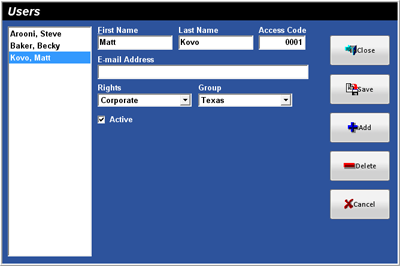
Figure 4.10 Users
Window
Figure 4.10.1 Users Window Fields
|
|
Description |
|
First Name |
|
|
|
A Last Name for the User, up to 20
alphanumeric characters. |
|
|
A unique 1 to 4-digit numeric code
for the User to gain access to the system. |
|
E-mail
Address |
An E-mail address for the User, up
to 75 alphanumeric characters. |
|
Rights |
Select from the list of Rights
that the User will be assigned. |
|
Group |
Select from the list of Groups
that the user will be assigned. |
|
Active |
Select this option if the User is
currently active in the system. |