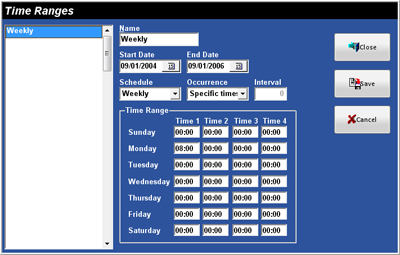
PurposeThe Time Ranges Window is used to
establish up to 100 TimeRanges. TimeRanges
are used in Reports and Events.Accessing the TimeRanges
MenuWhile in Focus Enterprise, select Setup > TimeRanges.Figure
4.9 TimeRanges WindowFigure 4.9.1 TimeRanges
Window Fields
Field
Description
Name
The name of the TimeRange,
up to 15 alphanumeric characters.
Start
Date
The Start Date for the TimeRange
(mm/dd/yyyy).
End
Date
The End Date for the TimeRange
(mm/dd/yyyy).
Schedule
Weekly
Occurrence Options
Specific
Times
The TimeRange can be set to run up to 4
times throughout the day.
TimeRange Option
TimeRange
Day
of Week
Time 1
Time 2
Time 3
Time 4
Sunday-Saturday
The first time
the Event will run.
The second time
the Event will run.
The third time the
Event will run.
The fourth time
the Event will run.
TimeRange
The TimeRange
can be set to run every x (Interval) minutes within two specified TimeRanges each day.
Interval Option
Interval
The Interval, in
number of minutes.
TimeRange Option
TimeRange
Day
of Week
Start
Stop
Start
Stop
Sunday-Saturday
The time the
Event will Start.
The time the
Event will End.
The time the
Event will Start.
The time the
Even will End.
Monthly
Occurrence Options
Specific
Times
The TimeRange can be set to run up to 4
times for the specified day of the month.
TimeRange Option
TimeRange
Day
Time 1
Time 2
Time 3
Time 4
The day of the month for the Event
(1-31).
The first time
the Event will run.
The second time
the Event will run.
The third time
the Event will run.
The fourth time
the Event will run.
TimeRange
The TimeRange
can be set to run every x (Interval) minutes within two TimeRanges
for the specified day of the month.
 Time Ranges