|
Field
|
Description
|
|
Font
|
The Font that will be
used when printing the report.
|
|
Size
|
The Font Size that will be used
when printing the report.
|
|
Style
|
The Windows Style of Font that
will be used when printing the report.
|
|
Color
|
The Color of the Font that will be
used when printing the report.
|
|
Landscape
|
The report will be printed in
Landscape.
|
|
File Format
|
|
Text
|
The report will
generate a text file. The File Name must end in .txt. Text files are
usually used when sending e-mails and can be printed.
|
|
Comma
Delimited
|
The report will
generate a Comma Delimited file. The File Name must end in .csv or .xls.
Comma Delimited files are normally used to import
into a database or Excel program.
|
|
Tab
Delimited
|
The report will
generate a Tab Delimited file. The File Name must end in .csv or .xls. Tab
Delimited files are normally used to import into a database or Excel
program.
|
|
|
Totals by
Date
|
A record is displayed for each day within the user’s
specified date range.
|
|
Record Limit
Options
|
|
None
|
All records will be
displayed.
|
|
Total
(Rank)
|
|
Column
|
The report will
limit the number of records for the selected column.
|
|
Limit
|
The number of
records to display.
|
In the example
below, only the top 3 stores are displayed based on Net Sales.
Example 1
|
Type: <None>
|
|
Type: Total (Rank)
Column: Net Sales
Ranking: 3
|
|
Store
ID
|
Net Sales
|
|
Store
ID
|
Net Sales
|
|
SK101
|
1542.21
|
|
SK101
|
1542.21
|
|
SK105
|
1256.54
|
|
SK105
|
1256.54
|
|
SK103
|
1145.25
|
|
SK103
|
1145.25
|
|
SK102
|
984.57
|
|
|
|
|
SK104
|
547.54
|
|
|
|
|
|
Total
(%)
|
|
Column
|
The report will
limit the number of records for the selected column to the percentage
entered.
|
|
Limit
|
The percentage of
records to display.
|
In the
example below, only the top 40% of the stores are displayed based on Net
Sales.
Example 1
|
Type: <None>
|
|
Type: Total (%)
Column: Net Sales
Ranking: 40
|
|
Store
ID
|
Net Sales
|
|
Store
ID
|
Net Sales
|
|
SK101
|
1542.21
|
|
SK101
|
1542.21
|
|
SK105
|
1256.54
|
|
SK105
|
1256.54
|
|
SK103
|
1145.25
|
|
|
|
|
SK102
|
984.57
|
|
|
|
|
SK104
|
547.54
|
|
|
|
|
|
Group
(Rank)
|
|
Column
|
The report will limit
the number of records for each Group for the selected column. Thus if the
record limit was set to “5” then the top 5 stores in each group would be
included.
|
|
Limit
|
The number of
records to display.
|
In the example
below, only the top 2 stores are displayed based on Net Sales.
Example 1
|
Type: <None>
|
|
Type: Group (Rank)
Column: Net Sales
Ranking: 2
|
|
Group
|
Store ID
|
Net Sales
|
|
Group
|
Store ID
|
Net Sales
|
|
Group
1
|
SK101
|
1542.21
|
|
Group
1
|
SK101
|
1542.21
|
|
|
SK102
|
1256.54
|
|
|
SK102
|
1256.54
|
|
|
SK103
|
1145.25
|
|
Group
2
|
SK104
|
984.57
|
|
Group
2
|
SK104
|
984.57
|
|
|
SK105
|
547.54
|
|
|
SK105
|
547.54
|
|
Group
3
|
SK106
|
245.54
|
|
Group
3
|
SK106
|
245.54
|
|
|
SK107
|
547.12
|
|
|
SK107
|
547.12
|
|
|
|
|
|
|
Group
(%)
|
|
Column
|
The report will
limit the number of records for each Group for the selected column to the
percentage entered. Thus if the record limit was set to the top “5” percent
then the top 5 percent of stores within the group would be included.
|
|
Limit
|
The percentage of
records to display.
|
In the
example below, only the top 5 percent of stores within each Group are
displayed based on Net Sales.
Example 1
|
Type: <None>
|
|
Type: Group (%)
Column: Net Sales
Ranking: 5
|
|
Group
|
Store ID
|
Net Sales
|
|
Group
|
Store ID
|
Net Sales
|
|
Group
1
|
SK101
|
1542.21
|
|
Group
1
|
SK101
|
1542.21
|
|
|
SK102
|
1256.54
|
|
Group
2
|
SK104
|
984.57
|
|
|
SK103
|
1145.25
|
|
Group
3
|
SK107
|
547.12
|
|
Group
2
|
SK104
|
984.57
|
|
|
|
|
|
|
SK105
|
547.54
|
|
|
|
|
|
Group
3
|
SK106
|
245.54
|
|
|
|
|
|
|
SK107
|
547.12
|
|
|
|
|
|
|
 Format
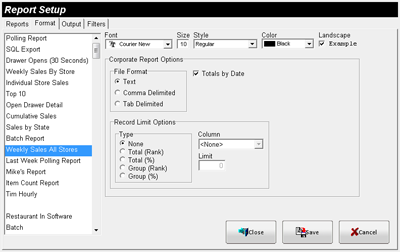 Figure
4.5.25 Restaurant Report Setup (Format) Window
Figure
4.5.25 Restaurant Report Setup (Format) Window