|
Name
|
Description
|
|
#
of Checks
|
The number of
Checks.
|
|
#
of Guests
|
The number of
Guests.
|
|
Avg.
Check
|
The Average
Check amount.
|
|
Avg.
Guest
|
The Average
Guest amount (PPA).
|
|
Void
$
|
The Void dollar
amount.
|
|
Void
Units
|
The number of
Voids.
|
|
Subtotal
|
The Subtotal
dollar amount.
|
|
Subtotal
Discount
|
The Subtotal
Discount amount.
|
|
Net
Sales
|
The Net Sales
amount.
|
|
Tax
Total
|
The Total Tax
amount.
|
|
Inclusive
Tax
|
The Inclusive
Tax amount.
|
|
Total
Sales
|
The Total Sales
amount.
|
|
Gift
Cards
|
The Gift Card
sales amount.
|
|
Refunds
|
The Refund
dollar amount.
|
|
Tip
Fee
|
The Tip Fee
dollar amount.
|
|
Total
Accountable
|
The Total
Accountable dollar amount.
|
|
Deposit
|
The Deposit
total.
|
|
Payment
Total
|
The Payment
total.
|
|
Gross
Cash
|
The Gross Cash
total.
|
|
Non-cash
Payments
|
The total of
Non-cash Payments.
|
|
Non-cash
Tips
|
The total of
Non-cash Tips.
|
|
Report
Group Units
|
The number of
units sold for all Report Groups.
|
|
Report
Group Sales
|
The sales amount
for all Report Groups.
|
|
RG$1-100:
|
The sales amount
for the selected Report Group.
|
|
RGUnits1-100:
|
The number of
units sold for the selected Report Group.
|
|
RGDisc$1-100:
|
The dollar
amount of Discounts for the selected Report Group.
|
|
Discount
Units
|
The number of
all Discounts.
|
|
Discount
Sales
|
The dollar
amount of all Discounts.
|
|
DISC$1-100:
|
The total dollar
amount for the selected Discount.
|
|
DISCUnits1-100:
|
The number of
times the selected Discount was applied.
|
|
TAXSALES1-16:
|
The taxable
sales for the selected Tax.
|
|
TAXCOLLECTED1-16:
|
The tax
collected for the selected Tax.
|
|
TAXEXEMPT1-16:
|
The dollar
amount of Tax Exempt sales.
|
|
Order
Type Units
|
The number of
items sold for all Order Types.
|
|
Order
Type Sales
|
The dollar
amount of sales for all Order Types.
|
|
Order
Type Charges
|
The dollar
amount of Order Type Charger for all Order Types.
|
|
OT$1-20:
|
The dollar
amount of sales for the selected Order Type.
|
|
OTUnits1-20:
|
The number of
items sold for the selected Order Type
|
|
OTCharges1-20:
|
The dollar
amount for the selected Order Type Charge.
|
|
Paidout
Units
|
The total number
of Paid Outs.
|
|
Paidouts
|
The dollar
amount of all Paid Outs.
|
|
PAIDOUT$1-100:
|
The dollar
amount for the selected Paid Out.
|
|
PAIDOUTUnits1-100:
|
The number of
times the selected Paid Out was used.
|
|
Paidin
Units
|
The total number
of Paid Ins.
|
|
Paidins
|
The dollar
amount of all Paid Ins.
|
|
PAIDIN$1-50:
|
The dollar
amount for the selected Paid Ins.
|
|
PAIDINUnits1-50:
|
The number of
times the selected Paid In was applied.
|
|
PAYMENTS$1-25:
|
The dollar
amount of the selected Payment.
|
|
PAYMENTUnits1-25:
|
The number of
times the selected Payment was applied.
|
|
RESTFIELD1:
|
The user-defined
field setup in Setup > General
> Reporting > Report Field Names > 1.
|
|
RESTFIELD2:
|
The user-defined
field setup in Setup > General
> Reporting > Report Field Names > 2.
|
|
Drawer
Open Count
|
The number of
times the drawer was opened. Note:
This Column must be Filtered and the Open Drawer Threshold defined in
the Filter Window before any data will be displayed.
|
|
BEGIN
DATE
|
The beginning
date of the report.
|
|
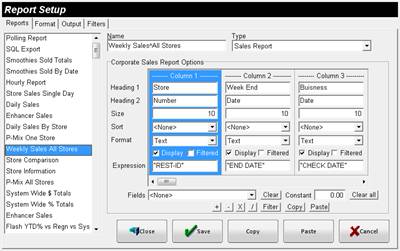
END
DATE
|
The ending date
of the report.
|
|
CHECK
DATE
|
The date of the
check.
|
|
CURRENT
DATE
|
The current
date.
|
|
REST-ID
|
The ID of the
restaurant established in Setup >
Restaurants > ID.
|
|
REST-NAME
|
The Name of the
restaurant established in Setup >
Restaurants > Name.
|
|
REST-ADDRESS
|
The Address of
the restaurant established in Setup
> Restaurants > Address.
|
|
REST-CITY
|
The City of the
restaurant established in Setup >
Restaurants > City.
|
|
REST-STATE
|
The State of the
restaurant established in Setup >
Restaurants > State.
|
|
REST-ZIP
|
The Zip Code of
the restaurant established in Setup
> Restaurants > Zip Code.
|
|
REST-GROUP
|
The name of the
Group.
|
|
REST-VERSION
|
The software version
the restaurant is currently running as of the last poll.
|
|
Column1-29
|
The
expression of the selected column is placed in the current column.
For example, if Column 3 is set for “Net
Sales” and Column 4 is set for “Gift Cards”, you can set the Expression
in Column 5 to calculate Net Sales + Gift Cards by inputting the
expression “Column3” + “Column4”.
|
|
ColumnTotal1-29
|
The
total for the specified column is placed in the current column.
|
|
ColumnGroupTotal1-29
|
The
Group total for the specified column is placed in the current column.
|
|
RankTotal1-29
|
The
Rank of the record compared to other records for the specified column.
|
|
RankGroupTotal1-29
|
The
Group Rank of the record compared to other records in the Groups for the
specified column.
|
 Reports