 Select Restaurant Select Restaurant
|
|
Purpose
The Select Restaurant Window is used to choose the default
restaurant for Focus Enterprise. The default restaurant determines the
configuration files used in the Restaurant Menu. The default restaurant is also
used as the primary selection for Restaurant Reports.
Accessing the Select
Restaurant Window
While in Focus Enterprise, select File > Select
Restaurant.
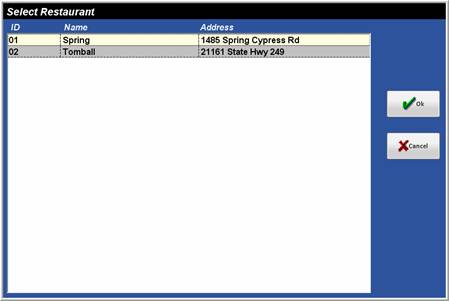
Figure 1.2 Select
Restaurant Window
Figure 1.3 Select Restaurant Window Fields
|
Field |
Description |
|
ID |
The ID of the restaurant established in Setup > Restaurants. |
|
Name |
The Name of the restaurant established in Setup > Restaurants. |
|
Address |
The Address of the restaurant established in Setup > Restaurants. |
Procedure to Select a
Default Restaurant
▪ Select the
desired Restaurant.
▪ Click OK.