|
Menu
Items
|
The List
will contain Menu Items.
|
Item
|
The
Menu Item ID, up to 25 alphanumeric characters. The number of Menu Items
in the list will appear in ().
|
|
|
Sort
Key
|
The
List will contain Sort Keys.
|
Item
|
The Sort
Key, up to 2 alphanumeric characters. The number of Sort Keys in the list
will appear in ().
|
|
|
E-mail
|
The
List will contain E-mail addresses.
|
Item
|
An
E-mail address, up to 25 alphanumeric characters. The number of E-mail addresses
in the list will appear in ().
|
|
|
Report
Groups
|
The
List will contain Report Groups.
|
Item
|
The
Report Group Name, up to 15 alphanumeric characters. The number of Report
Groups in the list will appear in ().
|
|
 Lists
Lists
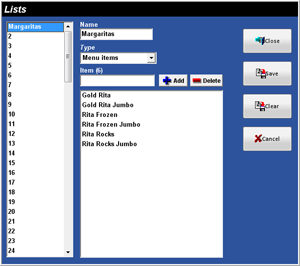 Figure
4.4 Lists Window
Figure
4.4 Lists Window
