Corporate/Local   
Purpose
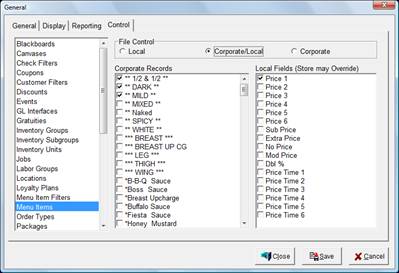
The Corporate/Local Control Window is used to determine the Records that can be modified only at the corporate level. The Menu Item Configuration File can be further configured to allow the store level to modify the Menu Item’s Price 1-6, Sub Price, Extra Price, No Price, Mod Price, Dbl% and Price Time 1-6 (see Figure 4.2.15 Control Window for Menu Items).
 
Accessing the Control Window
While in Focus Enterprise, select Setup > General > Control.
 
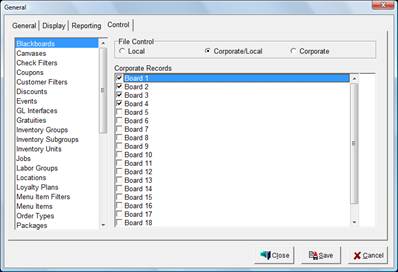
Figure 4.2.13 Corporate/Local Control Window
 
Figure 4.2.14 File Control Corporate/Local Control Window
Corporate Records
The selected Records are Corporate Records and cannot be changed at the store level.
 
Note: The Menu Item Configuration File can be further modified (see below).
 
Figure 4.2.15 Control Window for Menu Items
 
Figure 4.2.16 Menu Item Corporate/Local Options
Corporate Records
The selected Records are Corporate Records and cannot be changed at the store level with the exception of the Local Fields specified below.
Local Fields (Store may Override)
 
The selected Fields may be changed at the store level. This is a global setting for all Menu Items.
Local Field
Description
Price 1-6
Prices 1-6 may be changed at the store level.
Sub Price
Sub Price may be changed at the store level.
Extra Price
Extra Price may be changed at the store level.
No Price
No Price may be changed at the store level.
Mod Price
Mod Price may be changed at the store level.
Dbl %
Dbl % may be changed at the store level.
Price Time 1-6
Price Time 1-6 may be changed at the store level.

 
Procedure to Set Records from a Configuration File for Corporate/Local Control
Select the Configuration File from the menu list.
Select the Corporate/Local option.
Select the Records that can be modified only at the corporate level.


Related Topics (none)


Copyright © 2007 Focus POS Systems