|
Field
|
Description
|
|
Day of Week
|
The Day of the Week
to be used for the report column (Sunday – Saturday). If “<None>” is
specified, then all days will be used.
|
|
List
|
The List to include in the Filter.
If “<None>” is specified then all records will be returned.
|
|
Start
Time
|
The starting time for the report
column. If “00:00” is specified for the Start and End Time, then the entire
day will be used.
|
|
End Time
|
The ending time for the report
column. If “00:00” is specified for the Start and End Time, then the entire
day will be used.
|
|
Open Drawer
Threshold
|
The number of seconds the drawer
must be opened before being displayed on the report column. Note: This Field is to be used in
conjunction with the “Drawer Open Count” Expression Field.
|
|
Order
Type
|
The Order Type for the report
column. If “<None>” is selected then the report will display
information from all Order Types.
|
|
Totals
on Break
|
|
<None>
|
The report will not
Total on Breaks.
|
|
Totals
on Break
|
If this
option is selected, then all columns to the right of this column will be
totaled when the break occurs. Note:
The Sort Option should be used for the column with the Totals on Break
Option.
In the
example below, the Group Column has the Totals on Break option turned on.
|
Group*
|
Store ID
|
Net Sales
|
* The Group column has the Totals on Break option turned
on.
|
|
Group
1
|
SK101
|
547.58
|
|
|
|
SK102
|
648.41
|
|
|
|
SK103
|
994.54
|
|
|
Totals
|
|
2190.53
|
This is the Totals
on Break Row. The Total is calculated for all the stores within the Group
1.
|
|
|
|
|
|
|
Group
2
|
SK201
|
698.54
|
|
|
|
SK202
|
1211.57
|
|
|
|
SK203
|
784.54
|
|
|
Totals
|
|
2694.65
|
This is the Totals
on Break Row. The Total is calculated for all the stores within the Group
2.
|
|
|
|
|
|
|
Totals
|
|
4885.18
|
This is the
(Grand) Totals row. The Total is calculated for all Groups.
|
|
|
|
Revenue Center
|
The Revenue Center
for the report. If no Revenue
Center is selected then
the report will display information from all Revenue Centers.
|
|
Totals
Stop Column
|
Totals
for the column will not be displayed when breaks occur before the Totals on
Break column. Note: This option
only applies when the report has another column set with the “Totals on
Break” option.
In the
example below, the Group Column has the Totals on Break option turned on and
the % of Sales column has the Totals Stop Column set to 2.
|
Group*
|
Store ID
|
Net Sales
|
% of Sales
|
* The Group column has the Totals on Break option turned
on.
|
|
Group
1
|
SK101
|
547.58
|
25.00
|
|
|
|
SK102
|
648.41
|
29.60
|
|
|
|
SK103
|
994.54
|
45.40
|
|
|
Totals
|
|
2190.53
|
**
|
** The Total Stop Column for the “% of
Sales” column is set to 2 so the percentage totals are not calculated.
|
|
|
|
|
|
|
|
Group
2
|
SK201
|
698.54
|
25.92
|
|
|
|
SK202
|
1211.57
|
44.96
|
|
|
|
SK203
|
784.54
|
29.11
|
|
|
Totals
|
|
2694.65
|
|
|
|
|
|
|
**
|
** The Total Stop
Column for the “% of Sales” column is set to 2 so the percentage totals are
not calculated.
|
|
Totals
|
|
4885.18
|
**
|
** The Total Stop
Column for the “% of Sales” column is set to 2 so the percentage totals are
not calculated.
|
|
|
Date Range
|
|
Specific
Dates
|
|
<None>
|
The report will
use all days for the report column.
|
|
Start
Date
|
The starting date
for the report column.
|
|
End
Date
|
The ending date
for the report column.
|
|
|
Day
|
The last day of the
specified date range will be used for the report column.
|
|
Week
to Date
|
The last day of the
specified date range will be used to determine the week to date.
|
|
Month
to Date
|
The last day of the
specified date range will be used to determine the month to date.
|
|
Year
to Date
|
The last day of the
specified date range will be used to determine the year to date.
|
|
 Filter
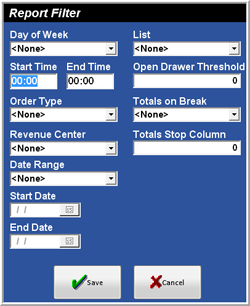 Figure
4.5.23 Report Filter Window
Figure
4.5.23 Report Filter Window